Showing posts with label Apps. Show all posts

Saturday, August 11, 2012

Podcasts! Episode 1: Using Downcast


I listen to a lot of podcasts, and it always surprises me that, as a form of media, podcasts are not more popular. In fact, when I have my headphones in and someone asks what I'm listening to, the usual response, after I tell them I'm listening to a podcast, is almost always,"What's a podcast?"

Podcasts began as audio only talk shows, and have since evolved into a very wide variety of genres, as well as HD video formats. There is something for everyone, more programming than many television networks, and yet podcasts remain under the radar for those not tech savvy.

So here it is, my attempt to get you guys into podcasts. First off, yes, Apple has their own app for podcasts, but it's not nearly the best out there. Downcast is the app you want:


Sure, Downcast is a few dollars on the App Store, as opposed to the free Apple Podcasts app, but it's ease of use and stability far outweighs the cost.

Here is a quick tutorial to get you started:

Once you have Downcast downloaded and installed (search for it in the App Store), the first thing to do is get some podcasts! Nearly all podcast subscriptions are free. It's actually very rare to find one that is not, so feel free to grab as many as you want.

In the upper right-hand corner, you'll find these four icons. What we need is the large addition symbol.


After hitting that, you'll see this window pop up:


If you already know the name of the podcast you want, you can search for it, otherwise select a category to browse many popular selections.

Once in a category, just select a podcast. I'll use The Nerdist as an example:


After selecting a podcast, you'll see a brief description. If you like what you see, go ahead and hit the Subscribe button. Podcasts are generally episodic, the most popular format being a weekly podcast. When you subscribe, Downcast will automatically download the latest episode. When Downcast is opened again, it will check for new episodes and again download anything new. Keep in mind, this is totally free.


After subscribing, the latest episode will start to download. The podcast will appear in your podcast list, and a new download badge will appear over the Downloads icon.


You can view the download's progress by hitting the Downloads icon in the upper right.


Once the download is finished, just select it to start playing. Congratulations! You are listening to a podcast.


Now, after you are done with that episode, you can delete it manually or have Downcast automatically delete podcasts marked as played (easily found under the settings menu). You can also browse previous episodes for download, or go search for some new favorites.


See? It's all very simple. Now go find some great podcasts!

~Ben

PS - I'll post some of my favorites soon.

Thursday, August 2, 2012

Notes and Reminders

My usual protocol when setting up a new iOS device, is to take all of the default apps and toss them into a junk folder, but lately Apple has been making these barebones apps very useful. Notes and Reminders are two of these apps that should not be overlooked.


While these apps do exist on the iPad, they are most efficient on the iPhone or iPod, since, in most situations, that's the device in your pocket.


Notes is a super fast app that is great for jotting things down on the go. You can now create a multitude of separate notes, and all of them can be saved and shared in various ways. Please note, it's not as secure as other document apps, like Awesome Note, which allows you to set up password encrypted notes, but that might be on the way.


Apple has polished up the default Reminders app by 'borrowing' aspects of other reminder apps on the App Store, making it the all around best reminder app you can get currently. It's also faster than most of the other apps, which helps with adding tasks on the fly, lists can synced with the calendar, and everything can be saved and shared.

So there you have it - Two apps that come free with iOS5 that are very well done. Try them out! It's surprising how quickly they became part of my daily routine.

With the way Apple has been working to make these default apps better than premium apps on the App Store, it leads me to believe that iOS6 is really going to be something great. I can't wait!

~Ben

Wednesday, June 27, 2012

Dunno


Dunno is a personal research tool that does the leg work for you. Sure you can find what you are looking for on a search engine, but Dunno will categorize and sort the results into a comprehensive and easy to follow index. It also saves your previous topics, so you can always jump right back to where you were working last. Highly recommended for students, but also a great addition to anyone's iOS device.

~Ben

Awesome iPad Games Now!

Here are three fantastic games to liven up your iPad:


Mutant Storm
I absolutely love this game! It's a twin stick shooter - Wait, wait, hold on! I know what you are thinking, but this shooter is truly exceptional. It's not like those millions of Geometry Wars clones that are clogging up the App Store. Mutant Storm offers a unique style of design and gameplay that the others just can't match, and above all else, it's fun! The fidelity of the control is spot on, which is something most shooters on iOS lack, and the challenges come naturally instead of ramping up to the point of frustration. This is a great game for the hardcore and casual gamers alike. Available on all current iOS devices.


Kingdom Rush
Tower defense games come and go, and can be difficult to distinguish the good from the bad. Kingdom Rush stands head and shoulders above the rabble. A comic book inspired design, engaging and fun gameplay, varied units and levels with many upgrades and strategies to employ. This is my current favorite TD game on any device. Right now, it's only available on the iPad, but the developers have said that it is on it's way to the iPhone and iPod as well.


Pocket Planes
Here's a fun little game to suck every minute of your life away. Pocket Planes comes from the makers of Tiny Tower, and offers much of the same style of gameplay, but is more satisfying. Instead of just growing your Tower ever upwards, you start with small airline and grow it into a global commuter and cargo empire. Select and manage planes, locations, routes, employees, passengers, cargo, vendors - everything you can imagine to dominate the airline industry and get those cute little people where they need to go. Available on all current iOS devices.
~Ben

Apple's Podcasts Vs Downcast

Many of Apple's updates and improvements to their iOS platform stem directly from 'borrowed' concepts and software from third party developers. The new Podcasts app from Apple is yet another example of this. Podcasts is a podcast catcher, much like Downcast and many others, that allows the user to search, add, subscribe, and edit podcasts all without having to sync with a PC or Mac.


Apple's Podcasts app offers a much more visually pleasing interface than Downcast, but unfortunately it doesn't seem like it was quite ready for launch. The app is slow, buggy, and still lacks a great many features that other podcast catchers offer. It's a good start, but the Podcasts app is, as of now, just not good enough to replace Downcast.
So don't toss out Downcast just yet! Apple's first attempt at a podcast catcher falls well below the bar. Maybe things will change with an update or three or maybe even iOS 6 - We'll just have to wait and see.

~Ben

Monday, May 28, 2012

SoundHound


There are a lot of music identifiers in the app store, but SoundHound is by far the fastest and easiest to use. Oh, and the basic app is totally free!

~Ben

Friday, May 25, 2012

Apps! Part One

So to start off, let's just take a look at some of the apps I have on my iPad right now:


BlogPress
- This is what I use to write and edit my posts here. It's not perfect, but it's close to a complete package, and easily the best Blogger editor in the App Store. It's easy to add pics directly from the camera roll, and each pic is simultaneously uploaded to Picasa in full resolution.


Songza
- The most diverse and user friendly streaming music service for your iOS device. Also, it's completely free, which is a plus.


My-Cast
- I've tried nearly all of the weather apps in the App Store and have found My-Cast to be the best! It's fast, easy to use, and updates weather information on the fly.


Flixster
- Forget those other movie apps, Flixster is the top dog, and with integrated reviews, previews, and articles from RottenTomatoes, you can't go wrong.


Whats On?
- Toss in your location and TV service info, and Whats On will give you a comprehensive list of everything that was, is, and will be coming on later.


Google Catalogs
- Online shopping is kinda dull, and on most sites, just plain ugly. Google apps combines the magazinerey (yes, I made up that word) of a mail order catalog and the ease of shopping online.


IGN Skyrim Guide
- I love me some Skyrim! There are plenty of Skyrim guides on the App Store, but none are as complete, easy to use, or as free as IGN's app. The interactive maps are the arrow in the knee of getting lost... Wow, that metaphor ran straight into a tree.


Movie360
- If you have an iOS device with a camera, you need this! It has real time filters and (the best part!) digital zoom! You can zoom in and out while recording, or later while watching videos! Why are you reading this? Go get this app! Zoom!


Downcast
- Getting Podcasts via iTunes is a headache, and unless you sync on a laptop or desktop computer, updating and editing the Podcasts is not possible. That's why you should be using a Podcast catcher, like Downcast. Downcast lets you search for your favorite Podcasts, and once added, updates them and tosses out what you've already watched or listened to.


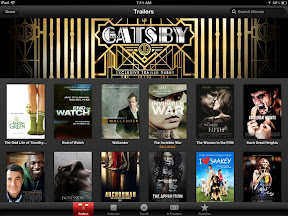
Apple Trailers
- Your one stop shop for movie trailers, past, present, and up-coming. Designed by Apple, so it's fast, ad free, and pretty to look at.


HBO GO
- Have HBO? Get the entire HBO library on the go with, well, GO! It's all in HD, free (if you already have an HBO subscription through cable, DirectTV, etc), and it's kept up to date.


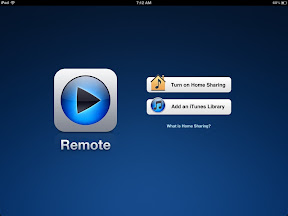
Remote
- Designed by Apple to work with nearly all Apple products. Control iTunes, AppleTV, and your local sharing network all from your iOS device. Fun and easy to use!


iPhoto
- A bit pricey compared to other apps, but well worth it. The interface is slightly counter-intuitive, but that is offset by the fantastic help function and wide range of very well developed editing tools. Amateur photographers will feel like pros within a few minutes.


Photoshop Express
- An all-around solid and free photo editor. It's very basic, but if you can't see the need to cover the cost of iPhoto, this is the next best thing. In fact, there are a couple things here that iPhoto lacks, like the ability to mirror an image, that makes Photoshop Express a nice addition to your editing tool bag.


Skitch
- Skitch is a photo editor that is specifically designed to add text, icons, arrows, and other layer effects to pictures. Again, this is something outside the bounds of iPhoto, and a great tool to have around.


Postagram
- This a service that is very cool. We all take pictures while on vacation, and yet we send someone else's photos as post cards. Postagram lets you send a post card with any picture in your photo album for just 99¢ each!


Half-Tone
- Turns any photo into a retro comic book panel. It's fun to use and there are plenty of options to unlock your creative side.


Diptic
- The best app for making photo collages. Very easy to use and useful.


Penultimate
- A simple notebook for sketches, notes, whatever you like, that is fun, fast, and easy to jump into. There are others like Penultimate, but aside from full painting apps like ArtRage, none of them are as complete or precise.


Kindle
- While I prefer the Barnes and Noble Nook devices, the Kindle app is the best eReader on iOS.


Comic Zeal
- My favorite comic reader on the iPad. Very fluid interface, plenty of organizing options, and simple methods of adding content.


Kotoba!
- The best and most comprehensive Japanese/Any Other Language dictionary.


iStart Japanese
- My favorite Japanese Tutor app (they have other language apps as well). Great for starting out or getting a refresher course.


Living Earth
- I like having a screen saver running on my iPad when it's on display and I'm not using it. Living Earth is a cool screen saver and a pretty good alarm clock as well.


PCalc
- The best calculator app. Nuf'said.


Clock Vetica
- It's a clock and nothing more, but it is gorgeous in a simple way. Text and background colors are your choice.


Nike Training
- A huge collection of exercises and training programs to keep you in shape! Updated often with instructional videos and varied set-by-step plans.


Convertr
- A unit converter. Yep, it's exciting. Useful too.


Table Score
- This is a simple app that acts as a scoreboard. That's about it. Use your imagination.

More later!

~Ben